
Key highlights
- Get every client's new reviews into one queue instead of checking each profile
- Triage by star rating before you write anything
- Keep a short voice note per client, including what's off limits
- Agree on approval and escalation rules during onboarding, not after a bad review
At three clients, replying to Google reviews is a task. At twelve, it's a job.
The work itself doesn't change. What changes is everything around it: logging into the right account, finding the new reviews, remembering how this particular client likes to sound, checking whether the 2-star from Tuesday needs the owner's input. That overhead is what turns a 20-minute task into half a day.
Here's a workflow that holds up as your client list grows.
Do the math on your own roster first
Most freelancers underestimate their review volume because it arrives in small pieces across different profiles.
Say you manage 12 clients and each gets 6 reviews a month. That's 72 reviews. Written properly, a response takes 3 to 5 minutes, so you're at 4 to 6 hours a month just on writing. Add the time spent logging in and finding what's new, and it's closer to 8.
That's a full working day every month on one line of your service. Worth knowing before you price it, and worth knowing before you decide how to handle it.
One queue, not twelve dashboards
The biggest time sink isn't writing. It's checking.
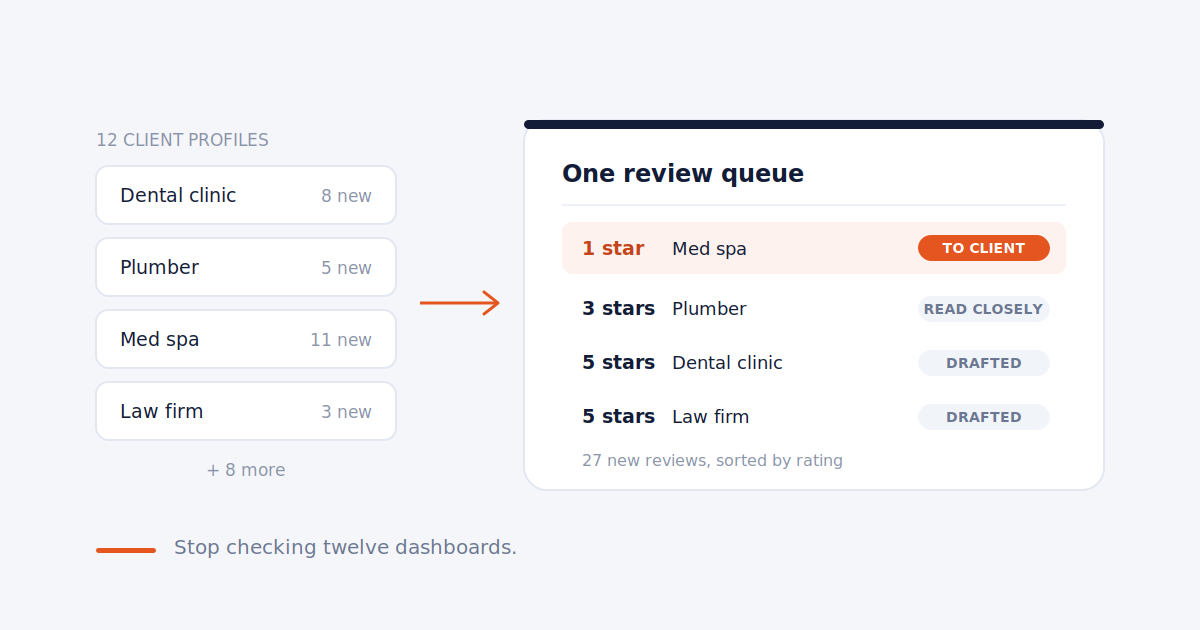
If your process is "log into each client's profile and look for new reviews," you're doing 12 logins to find work that might not exist. On a quiet week, most of those checks come up empty and you've spent an hour confirming nothing happened.
Get every client's new reviews into one place. That could be email notifications routed to a single inbox with a filter per client, a spreadsheet you update, or a tool that pulls them together. The method matters less than the principle: you should see all new reviews across your roster in one view, and never have to go looking.
Triage before you write
Not every review needs the same attention. Sort them before you start.
5 and 4 stars: reply within a day or two. These are quick, and they're the bulk of your volume.
3 stars: read carefully. Mixed reviews often contain a specific complaint wrapped in politeness, and a generic "thanks for the feedback" misses it.
1 and 2 stars: these get their own process, covered below.
Working through the queue in that order means the fast ones clear quickly and your attention goes where it's needed.
Keep a voice note for every client
This is the part that makes review management scale without sounding robotic.
For each client, keep a short note. A paragraph is enough:
- How formal they are
- Who signs off (the owner by first name, "the team," nothing)
- Words or phrases they use and avoid
- Anything that's off limits
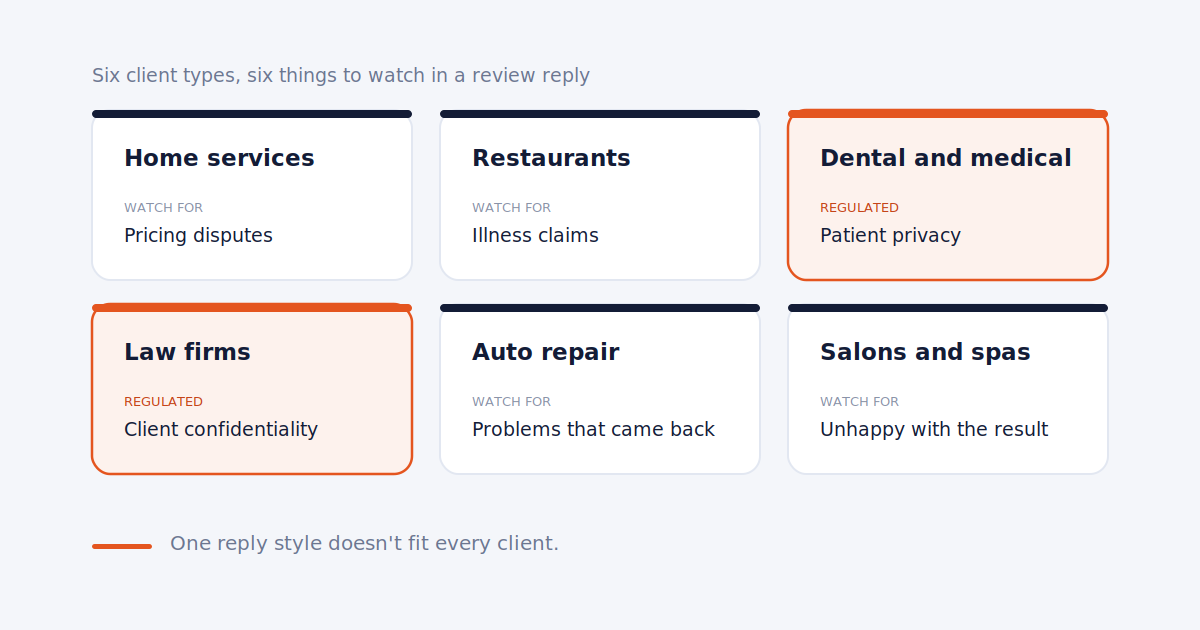
That last item matters more than it sounds. Some industries have real constraints on what a reply can say. A healthcare practice generally shouldn't confirm that the reviewer was a patient. A law firm shouldn't discuss the details of a matter. A restaurant might have a policy on offering refunds publicly. Write these down once, so you never have to remember them under pressure.
With a voice note, you can write in a client's voice in the time it takes to read one paragraph. Without it, every reply starts from zero.
We covered the healthcare case in detail in how to respond to Google reviews for dental practices.
Templates are a starting point, not a reply
Copy-paste templates save time for about a month, then start costing you.
People read reviews, including the replies. A prospect scrolling a business's profile who sees the same sentence under twenty reviews reads it as automated, because it is. It also tells the reviewers you didn't read what they wrote.
Use templates for structure: thank them, reference something specific they said, add one line that fits the business, sign off. Then change the specific part every time. Mentioning the dish they ordered, the technician they named, or the problem that got solved takes ten seconds and makes the reply read as human. We went into why sameness hurts across all GBP content in why your GBP posts sound the same for every client.
For examples by client type, see Google review reply examples for 6 types of local business clients.
Have a separate process for negative reviews
Negative reviews shouldn't go through the same fast lane as the rest.
Agree with each client, before it happens, what the process is. A common setup: you draft a response for anything 2 stars or below, send it to the client, and post once they approve. Set a time limit on approval, maybe 24 hours, so a reply doesn't sit unposted for a week while the review sits unanswered.
The reason is simple. A negative review is often about something you have no visibility into. The client knows whether the complaint is fair, whether there's context, and whether they want to offer to make it right. Posting a reply without that information is how you end up publicly defending something the business actually got wrong.
We covered how to write these replies in detail in responding to negative reviews.
Agree on the rules upfront
Most review-management friction with clients comes from things nobody discussed at the start. Settle these during onboarding:
- Approval: does the client want to see positive replies, or only negative ones?
- Response time: what's your commitment? 48 hours is reasonable and defensible for most businesses.
- Escalation: what counts as "the client needs to see this"? Anything under 3 stars, any mention of injury or legal action, any named employee.
- Fake reviews: who decides whether to flag a review, and who handles it? We covered the full process in what to do when a client gets a fake Google review.
Writing this down takes fifteen minutes and saves you the conversation where a client asks why a reply went up that they didn't like.
Where AI drafting fits
AI tools are genuinely useful here, with one condition: they work from the voice note, not instead of it.
An AI draft that knows the client's tone, sign-off, and off-limits topics gets you 80% of the way in a few seconds. You read it, fix the specific detail, and post. An AI draft with no context produces exactly the generic sameness that templates do, just faster.
We compared the tools for this in AI review response software for GBP consultants.
Report it so the client sees it
Review work is almost invisible to clients. They don't watch you reply. So put it in the monthly report: new reviews this month, current average rating, your response rate as a number, and any review that needs their attention.
A response rate of 100% sitting in every report is quiet, consistent proof that the work is happening. More on what to include in the monthly local SEO report.
Frequently asked
How fast should I respond to Google reviews? Within 48 hours is a sensible standard for most businesses. Negative reviews are worth prioritizing, but only after the client has had a chance to weigh in.
Should I reply to every review, including 5-star ones with no text? Yes, briefly. A short thank-you shows the business is paying attention, and it's the easiest volume to clear.
Can I use the same reply for multiple reviews? You can reuse the structure, but change the specific details each time. Identical replies across a profile read as automated to anyone scrolling through.
Should the client approve every reply? Usually just the negative ones. Requiring approval on every 5-star reply slows everything down without adding much protection.
How much time does review management take per client? Roughly 20 to 40 minutes a month for a typical small business, depending on volume. The bigger cost is the overhead of checking many profiles separately, which is why a single queue matters.
Every client's reviews, one queue.
Surfa pulls new reviews from every client profile into one place and drafts replies in each client's voice. Flat pricing, not per location.
Start free trial