
Key highlights
- Google removes reviews that break specific rules, not reviews that are just unfair
- Report through the Reviews Management Tool so you can track the decision
- You get one appeal and can appeal up to 10 reviews at once
- Never bury a fake review with fake positive ones
Sooner or later every client sends you the same message: "This review is fake. Can you get it removed?"
Sometimes they're right. Often the review is real, just unfair or exaggerated. Either way, you're the one who has to explain what's possible, and the answer is more limited than most clients expect.
Here's how to handle it without overpromising.
First, work out if it's actually fake
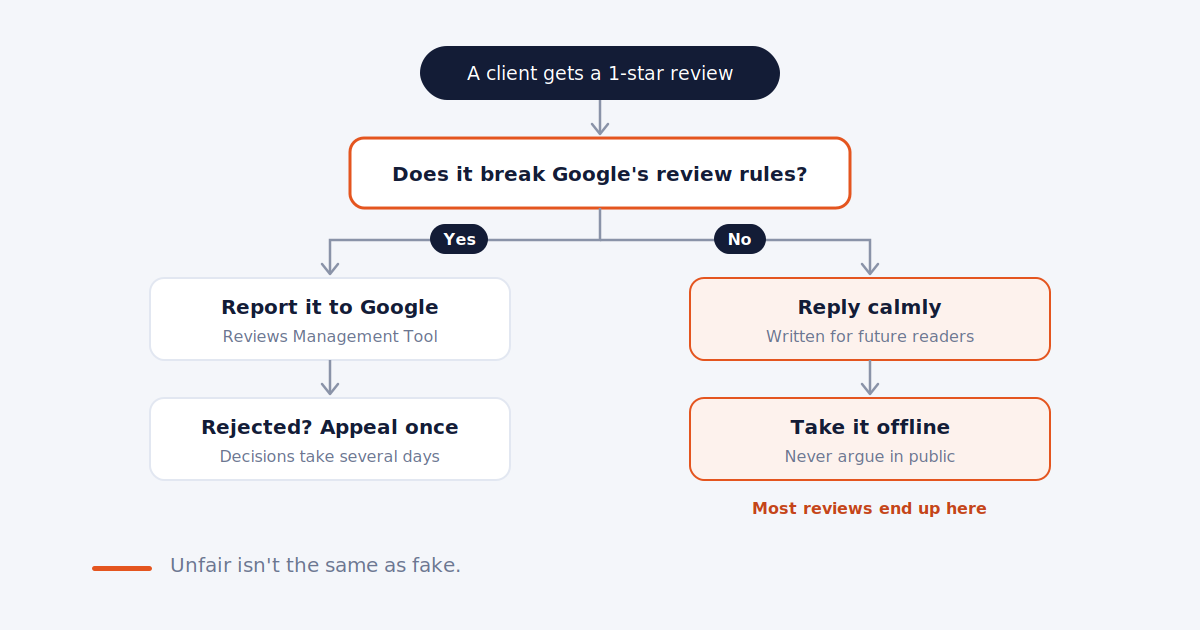
Clients use "fake" to mean two different things: a review from someone who was never a customer, and a real review they think is unfair. Google removes the first kind, along with a few other specific violations. A genuine bad experience, described in reasonable terms, stays up.
Signs a review may not be genuine:
- The client has no record of the person, and the details don't match anything that happened
- The reviewer's profile has no other reviews, or a string of 1-star reviews for competing businesses
- It describes a service, product, or location the business doesn't offer
- Several negative reviews arrive within a day or two, often with similar wording
- The reviewer appears to be a former employee, a competitor, or someone with a personal dispute
Ask the client to check their own records privately. You don't need to see customer data to do this, and for healthcare clients you shouldn't. We covered why in how to respond to Google reviews for dental practices.
What Google will remove
Google's rules for reviews cover a specific list. The ones that come up most for local businesses:
- Fake engagement: content not based on a real experience, paid reviews, or coordinated posting from multiple accounts
- Conflict of interest: reviews from employees, owners, competitors, or people with family ties to the business
- Harassment: threats, personal attacks, or posting someone's private information
- Offensive content: including unsubstantiated accusations of criminal or unethical behavior
- Off-topic: general political or social commentary that isn't about the business
- Impersonation: someone posing as another person or organization
What's not on the list: reviews that are harsh, unfair, or one-sided but describe a real visit. Google says plainly that genuine negative experiences are allowed. That's the conversation to have with the client early, because it saves a lot of frustration later.
How to report it
You can flag a review from the profile itself, but the better route is Google's Reviews Management Tool, because it lets you track what happens.
- Open the Reviews Management Tool and sign in with the account that manages the profile
- Select the business and choose "Report a new review for removal"
- Find the review, click Report, and pick the rule it breaks
- Submit
Pick the reason that matches the actual rule broken. A competitor's review is a conflict of interest, not spam.
Before you submit, save a screenshot of the review, the date, and a link to the reviewer's profile. Reviews and profiles can change, and you'll want the record if you appeal or if the client asks later what happened.
What happens next
Google says evaluation typically takes several days. The tool shows the status as one of three:
- Decision pending
- Report reviewed, no policy violation found
- Escalated, in which case check your email
If Google finds no violation, you get one appeal. You can appeal up to 10 reviews at once through the same tool. Use it on the reviews where you have the strongest case, and be specific about which rule was broken.
After a rejected appeal, the policy route is closed. Don't keep re-reporting the same review. It won't help, and it takes time away from the ones that can come down.
When it goes beyond Google's rules
If a review makes claims the client believes are false and damaging, like accusing them of a crime, that may be a legal matter rather than a policy one. Google has a separate legal removal request for content that may be unlawful.
That route belongs to the business owner, not you, and usually needs a lawyer. Your job is to point them to it and hand over the records you saved.
Reply while you wait
Removal can take days or not happen at all. In the meantime, the review is public, and a calm reply is often worth more than the removal would have been.
Keep it short, don't accuse the reviewer of lying, and don't reveal anything from the client's records. Something like:
We take every review seriously, but we can't find a record of this visit. If you did work with us, please call us at [number] so we can look into it.
That reads well to anyone scrolling the profile, whether or not the review is real. For healthcare clients, skip the "no record" line and use the general reply from the dental guide instead. For negative reviews more broadly, see responding to negative reviews.
What not to do
Don't post fake positive reviews to bury it. Google can pause new reviews and show public warnings on profiles caught doing this. It turns one bad review into a much bigger problem.
Don't ask friends or staff to flag it. Extra flags don't speed up Google's decision. One report through the tool, with evidence, is the stronger case.
Don't promise removal. No one outside Google decides what comes down. Be wary of any service that guarantees it.
Don't flag every negative review. Save reports for real violations. It keeps your judgment credible with the client.
Set this up before it happens
The first fake review is a bad time to work out who does what. In your onboarding, agree on:
- Who decides whether a review gets reported, you or the client
- That removal isn't guaranteed and appeals happen once
- That the client handles any legal route, with you supplying the records
We listed this alongside the other review rules worth settling early in how to manage Google reviews for multiple clients.
Then log flagged reviews and their outcomes in your monthly report. Clients rarely see this work, and a line like "reported 2 reviews, 1 removed, 1 under appeal" shows it's being handled.
Frequently asked
How long does Google take to review a report? Google says it typically takes several days. You can check the status in the Reviews Management Tool.
Can I appeal if Google doesn't remove it? Yes, once. You can appeal up to 10 reviews at a time through the Reviews Management Tool.
Will Google remove a negative review that's unfair? Not if it describes a genuine experience. Google removes reviews that break specific rules, like fake engagement, conflicts of interest, or harassment.
Should I reply to a review I've reported? Usually yes. A calm, short reply helps future readers while the report is pending. Don't accuse the reviewer or share any customer details.
Can I report a review a competitor left? Yes. Reviews from competitors fall under Google's conflict of interest rules. Save any evidence of the connection.
Every review, every client, one queue.
Surfa pulls new reviews from every client profile into one dashboard, so the one that needs reporting doesn't get missed.
Start free trial