
Key highlights
- Free extensions are as good as paid tools for one-off diagnosis; they fail at history, aggregation, workflow, and client reporting; the break-even is usually five to eight client profiles; check primary category first, it's the most common finding
You do not need a paid stack to audit a Google Business Profile. For a single profile, the free tools are genuinely good, and a lot of experienced consultants run most of their diagnostic work through them.
Here's what's worth having, what each one is actually for, and the specific point where free stops being enough.
The two that aren't optional
Google Business Profile itself. Obvious, but worth saying: the dashboard is the source of truth. Insights, review data, post history, and the edit log all live there. Any third party tool is reading a copy.
Google Search Console. Free, and the only place you get real query data for a client's website. If you're reporting on local visibility without it, you're reporting on rankings instead of outcomes.
Neither of these is a differentiator. They're the floor.
Chrome extensions do the diagnostic work
This is where free tools genuinely compete with paid ones. Extensions show you data inside Google itself, which is where you're already working.
Category research. The single highest-leverage thing you can check on a profile is the primary category, and the fastest way to check it is an extension that reveals what competitors in the map pack are using. PlePer and GMBSpy both do this. Being able to see that the three businesses ranking above your client all use a category your client doesn't is a five-second finding that can reshape a whole engagement.
Profile audits. GMBeverywhere runs a structured audit on any profile you're looking at, including competitor profiles. Useful during prospecting, because you can walk into a first conversation already knowing what's wrong.
Most consultants run two or three of these together. They solve different slices and they stack fine.
What free tools are genuinely good at
One-off diagnosis. Finding a wrong category, spotting a duplicate, checking a competitor's setup. Free tools are as good as paid ones here.
Prospecting. You can audit a stranger's profile in two minutes and open a conversation with something specific. That's worth more than any dashboard.
Learning. If you're newer to local SEO, extensions teach you what to look at faster than a paid platform does, because they show raw data instead of a score.
Where free stops working
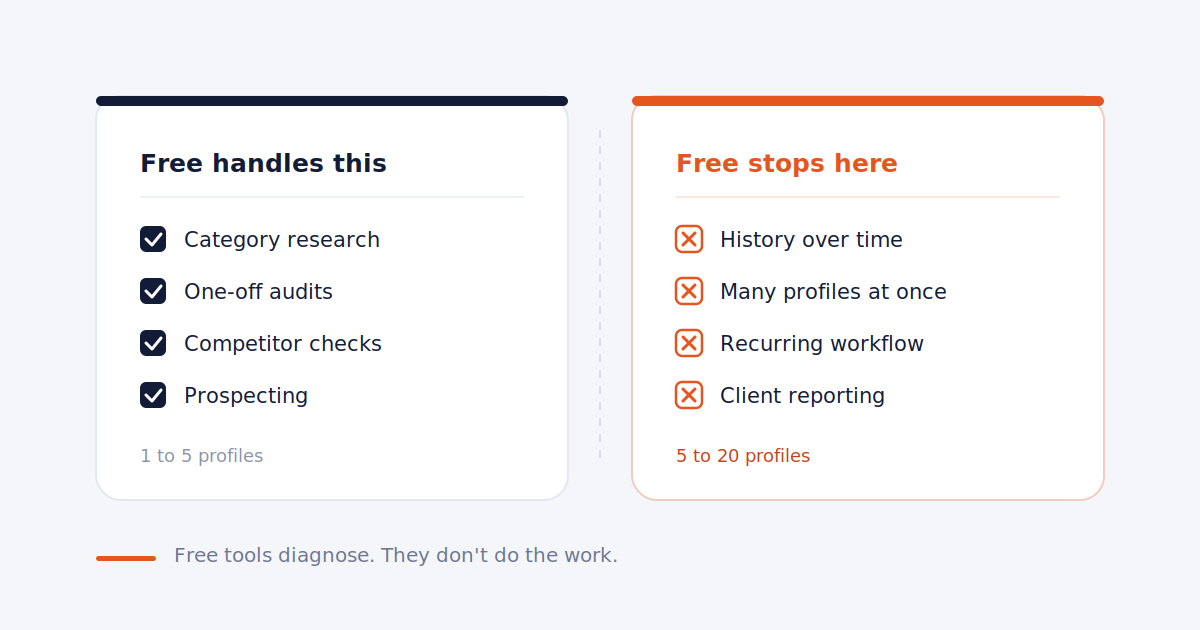
Free tools are built to answer a question right now. They aren't built to answer it repeatedly, for a dozen businesses, over months. Four specific failures:
No history. An extension tells you today's state. It can't tell you the category changed six weeks ago, or that review volume dropped after a bad month. Local SEO is mostly about drift, and drift only shows up over time.
No aggregation. Checking ten profiles means ten sessions of opening tabs, logging into the right account, and remembering what you found. That's the multiplication problem. One profile is five minutes. Ten profiles every week is most of a day.
No workflow. Extensions diagnose. They don't help you respond to 40 reviews, publish posts across a roster, or track what you've already done. Diagnosis is a small slice of the actual job.
No client output. Nothing free produces something you can send a client. And the reporting is often what the client is actually paying for, whether or not they'd say so.
When it's time to pay for something
A reasonable rule: pay when the free version of a task starts costing more in your hours than the tool costs in dollars.
Concretely, that's usually somewhere around five to eight client profiles. Below that, free tools plus a spreadsheet is a defensible setup and plenty of consultants run that way profitably. Above it, the manual overhead compounds faster than most people expect, and you end up paying for the tool in lost hours whether or not you buy one.
If you want to work out what that break-even actually looks like for your own client count, we covered the math in our guide on what to charge for GBP management.
The honest stack
For a freelancer with one to five clients: GBP dashboard, Search Console, a category extension, an audit extension, and a spreadsheet. That's free and it works.
For five to twenty clients: keep all of the above for diagnostics, and add something that handles the repeating work. The extensions don't stop being useful. They stop being sufficient.
Frequently asked
Are free local SEO tools good enough for client work? For diagnosis, yes. For managing recurring work across multiple clients, no. Most consultants keep using free extensions long after they've bought a platform.
What's the best free tool for GBP category research? PlePer and GMBSpy both surface competitor categories directly in search results. Checking the primary category against the top three map pack results is the fastest audit you can run.
Do I need a paid tool to track local rankings? Not for spot checks. You do if you need position history over time or a report to send a client, since free tools don't store anything.
Which free tool should I install first? A category checker. Wrong or missing primary categories are the most common finding on client profiles and the quickest thing to fix.
Free tools diagnose. They don't do the work.
Surfa handles the repeating part across every client profile: reviews, posts, rank tracking, and reports from one dashboard.
Start free trial